Гамма-спектрометрия без привязки к ПК или телефонуPortable gamma spectrometry, no PC or phone attached
Пять открытых инструментов для гамма-спектрометрии. ESP32-S3 подключается к спектрометру по USB и раздаёт спектр по WiFi — весь комплект работает в поле от обычного павербанка.Five open tools for gamma spectrometry. An ESP32-S3 bridges the spectrometer over USB and streams the spectrum over WiFi — the whole kit runs in the field from an ordinary power bank.
Работа в поле от павербанкаField operation from a power bank
Питание не привязано к телефону или ПК. Комплект потребляет ≈1 Вт и раздаёт спектр по WiFi.Power is not tied to a phone or PC. The kit draws ≈1 W and streams the spectrum over WiFi.
Программировать не нужноNo programming needed
Готовые .exe на страницах релизов, прошивка платы заливается флешером в несколько кликов.Prebuilt .exe files on the releases pages; the board is flashed in a few clicks.
Индустриальные форматыIndustrial formats
N42.42, BecqMoni, InterSpec, ЛСРМ и RadiaCode — данные открываются в привычном ПО.N42.42, BecqMoni, InterSpec, ЛСРМ and RadiaCode — data opens in the software you already use.
ЭкосистемаEcosystem
Пять репозиториев, закрывающих полный путь сигнала: прибор → шлюз → приём → анализ.Five repositories covering the full signal path: device → gateway → capture → analysis.
waterfall-esp32
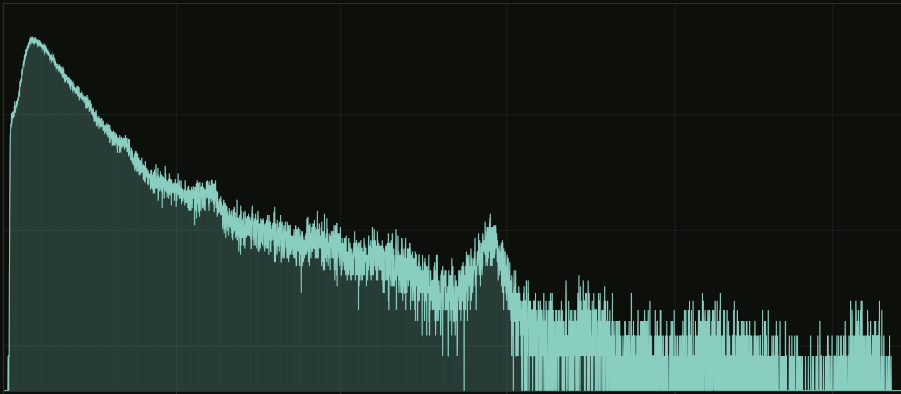
прошивкаfirmware ESP32-S3Сердце комплекта: плата ESP32-S3 подключается к спектрометру по USB (OTG Host) и заменяет телефон или ПК — спектр смотрят в браузере с любого устройства в той же сети. Web UI показывает живой 8192-канальный спектр с маркерами линий и мощностью дозы, водопад накоплений и мониторинг платы; в поле шлюз сам поднимает точку доступа и работает от павербанка. Накопленное хранится на flash и выгружается прямо из браузера в форматах BecqMoni, InterSpec, N42.42 и ЛСРМ .spe. Для десктопного ПО открыт TCP-мост (порт 8234): BecqMoni или wf-recorder получают поток так, будто прибор подключён напрямую.The heart of the kit: an ESP32-S3 board connects to the spectrometer over USB (OTG Host) and replaces the phone or PC — the spectrum is viewed in a browser from any device on the same network. The Web UI shows the live 8192-channel spectrum with line markers and dose rate, an accumulation waterfall and board monitoring; in the field the gateway raises its own access point and runs from a power bank. Data is stored on flash and exported straight from the browser as BecqMoni, InterSpec, N42.42 and ЛСРМ .spe. A TCP bridge (port 8234) lets desktop software — BecqMoni or wf-recorder — receive the stream as if the device were wired directly.
waterfall-viewer
desktop Windows / PythonАнализ длительных записей: суточный лог разворачивается в 3D-поверхность или 2D-карту «время × энергия», где короткий всплеск активности или дрейф фона виден сразу — без перебора сотен спектров вручную. Любой момент записи раскрывается в обычный спектр, любая энергетическая линия — в график её хода во времени; выделенный ROI сверяется с библиотекой 21 нуклида. Читает .aswf, RadiaCode .rcspg и N42.42; многочасовые файлы грузятся потоково, без загрузки целиком в память.Analysis of long recordings: a day-long log unfolds into a 3D surface or a 2D time × energy map, where a short activity burst or a background drift is seen at once — without scrolling through hundreds of spectra by hand. Any moment of the record opens as an ordinary spectrum, any energy line as a graph of its behaviour over time; a selected ROI is checked against a 21-nuclide library. Reads .aswf, RadiaCode .rcspg and N42.42; multi-hour files stream in without loading fully into memory.
wf-recorder
desktop Windows / stdlibСтраховка длинных сессий: клиент на ПК периодически забирает сегменты водопада со шлюза и сшивает их в единый .aswf — суточная запись не зависит от открытой вкладки браузера и переживает обрывы WiFi. Сегмент удаляется с платы только после подтверждённой записи на диск (fsync); целостность контролируют CRC32 и порядковые номера, поэтому пропуск в записи виден сразу, а не при разборе данных. Параллельно ведёт лог температуры платы в CSV; на странице релизов — готовый .exe без зависимостей.Insurance for long sessions: a PC client periodically pulls waterfall segments from the gateway and stitches them into a single .aswf — a day-long recording no longer depends on an open browser tab and survives WiFi drops. A segment is deleted from the board only after a confirmed disk write (fsync); integrity is guarded by CRC32 and sequence numbers, so a gap in the recording shows up at once rather than at analysis time. It also logs board temperature to CSV; the releases page has a ready-made, dependency-free .exe.
waterfall-esp32-flasher
desktop Windows / PythonУбирает главный барьер — прошивку платы: вместо esptool и командной строки — окно с двумя списками. Флешер сам находит COM-порт, скачивает актуальный релиз прошивки с GitHub и заливает его по USB в несколько кликов; обновление на новую версию — та же процедура. Один инструмент обслуживает четыре проекта: AtomSpectra, AtomFast, Radex, RadonEye.Removes the main barrier — flashing the board: instead of esptool and the command line, a window with two drop-downs. The flasher finds the COM port itself, downloads the current firmware release from GitHub and writes it over USB in a few clicks; updating to a new version is the same procedure. One tool serves four projects: AtomSpectra, AtomFast, Radex, RadonEye.
esp32s3-diag
прошивкаfirmware ESP32-S3 + флешерESP32-S3 + flasher«Рентген платы» на случай, когда прибор и шлюз не видят друг друга: диагностическая прошивка прогоняет цепочку Boot → WiFi → USB Host → Enum → Detect → Handshake и показывает в Web UI, на каком именно звене обрывается связь. Читает USB-дескрипторы и endpoints, выполняет FTDI vendor init и пробует SHPROTO-рукопожатие — вместо гадания по симптомам получается точный диагноз. Ставится one-click флешером; перед тестами обязателен backup настроек прибора (см. README), после — возврат штатной прошивки тем же флешером.An “X-ray of the board” for when the device and the gateway don't see each other: the diagnostic firmware runs the Boot → WiFi → USB Host → Enum → Detect → Handshake chain and shows in the Web UI exactly which link the connection breaks at. It reads USB descriptors and endpoints, performs FTDI vendor init and attempts a SHPROTO handshake — a precise diagnosis instead of guessing from symptoms. Installed with the one-click flasher; a backup of the device settings is mandatory before tests (see README), and the stock firmware is restored with the same flasher afterwards.
Как связаны компонентыHow components connect
Кликните по узлу — раскроется подробное описание этапа и скриншоты.Click a node — a detailed stage description and screenshots will open.
ФорматыFormats
Живое демо шлюзаLive gateway demo
Тот же интерфейс, что открывается в браузере при подключении к шлюзу — вкладки «Спектр», «Водопад», «Мониторинг». Можно покликать прямо здесь.The actual gateway Web UI that opens in the browser when you connect — Spectrum, Waterfall and Monitoring tabs. Interact with it right here.
демо-режим без подключённого прибора · данные симулированыdemo mode, no device connected · data simulated
В разработкеRoadmap
Запись на внешние носителиExternal storage
Сохранение водопада напрямую на SD-карту платы — многосуточные записи без ПК и без ограничения объёмом flash.Recording the waterfall straight to the board's SD card — multi-day records with no PC and no flash-size limit.
Подключение GPSGPS support
Привязка каждого спектра к координатам приёмника — трек измерений вместе с данными в одном файле.Tagging every spectrum with the receiver's coordinates — a measurement track together with the data in one file.
Поиск и картированиеContamination mapping
GPS + автономное питание + непрерывная запись: поиск источников и картирование радиоактивных загрязнений.GPS + autonomous power + continuous recording: locating sources and mapping radioactive contamination.
Все эксперименты со спектрометрами и подключённым оборудованием вы проводите на свой страх и риск. Проекты предоставляются «как есть» (as is), без каких-либо гарантий. Авторы и участники не несут ответственности за любой вред, прямой или косвенный: повреждение спектрометра, детектора, ФЭУ, ESP32-платы, компьютера или иного оборудования, потерю данных или настроек прибора.
В частности:
- Команды настройки прибора (
-ris,-fall,-nos,-max,-hyst,-U,-V,-stepи др.) изменяют внутреннюю конфигурацию обработки сигнала и аппаратные параметры HV/усиления (POT / POT2). Неверные значения могут сбить заводскую настройку детектора или повредить прибор. Параметры индивидуальны для каждого экземпляра — не записывайте их «вслепую» и не копируйте чужие значения. - Высокое напряжение (HV) детектора — потенциально опасно для прибора при неверной настройке.
- Восстановление сбитой настройки детектора выполняет производитель прибора, а не шлюз. При сбое заводского профиля детектора обращайтесь к производителю, не пытайтесь восстановить параметры самостоятельно.
- Опция очистки спектра при старте шлюза стирает накопленные на приборе данные — сохраните их штатным ПО заранее.
- Флешер перезаписывает flash выбранной платы: проверяйте COM-порт, посторонние USB-устройства прошивать нельзя.
Используя эти проекты, вы соглашаетесь, что понимаете риски и принимаете полную ответственность за свои действия с оборудованием. Полный текст условий — в README каждого репозитория.
All experiments with spectrometers and connected equipment are carried out at your own risk. The projects are provided “as is”, without any warranty. The authors and contributors are not liable for any damage, direct or indirect: damage to the spectrometer, detector, PMT, ESP32 board, computer or other equipment, or loss of data or device settings.
In particular:
- Device configuration commands (
-ris,-fall,-nos,-max,-hyst,-U,-V,-step, etc.) change the internal signal-processing configuration and hardware HV/gain parameters (POT / POT2). Wrong values can disturb the detector's factory calibration or damage the device. These parameters are unique to each unit — do not write them “blindly” and do not copy someone else's values. - The detector's high voltage (HV) is potentially dangerous to the device if set incorrectly.
- Restoring a disturbed detector calibration is done by the device manufacturer, not by this gateway. If the factory detector profile is corrupted, contact the manufacturer; do not try to restore the parameters yourself.
- The gateway's “clear spectrum on start” option wipes the data accumulated on the device — save it with the stock software beforehand.
- The flasher overwrites the selected board's flash: check the COM port; do not flash unrelated USB devices.
By using these projects you agree that you understand the risks and accept full responsibility for your actions with the equipment. The full terms are in each repository's README.