atomspectra-waterfall-esp32
Waterfall (spectrogram) — accumulate, stream to PC, export
The gateway can accumulate a waterfall (spectrogram): a sequence of spectra
taken at fixed intervals. Each waterfall row is a delta of the cumulative
spectrum over one interval — i.e. a finished “counts-per-period” spectrum,
8192 channels, uint16 per channel (16 KB per row).
You can:
- record it to Flash autonomously as
.aswfsegments — no browser (#REC-11-A1): press “Start”, close the tab — the board keeps recording on its own and survives a reboot / power loss (see Autonomous segment recording); - view it right in the board’s browser —
http://<board-ip>/waterfall; - stream it to a PC live over WebSocket;
- pull finished
.aswfsegments over HTTP (/api/waterfall/segments→/api/waterfall/segment?name=…) and stitch them on the PC / in the browser; - export it with the “⬇ Export .n42” button right from the Web UI — the board builds ANSI N42.42 from the PSRAM ring (works even without flash persistence);
- convert to ANSI N42.42 with the scripts shipped in this repo;
- open it as a 2D waterfall in the offline viewer shipped in this repo.
mDNS. The gateway announces itself as
atomspectra.local(#REC-9) — everywhere below you may usehttp://atomspectra.local/instead of<board-ip>.
What it looks like
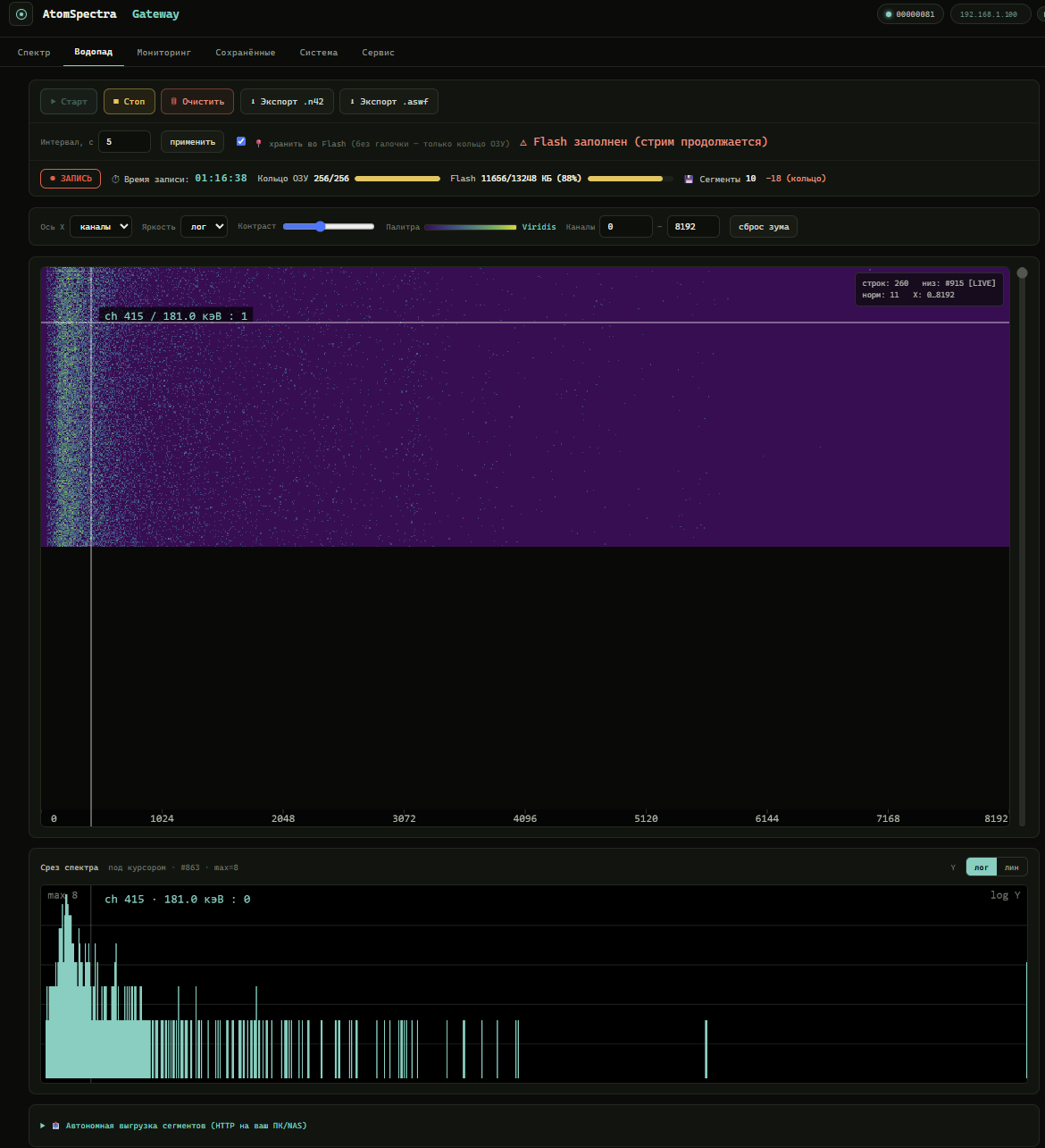
Built-in waterfall Web UI (http://<board-ip>/waterfall): the spectrogram on top
(time flows downward, X axis is channels/energy), with a slice of the current
spectrum under the hovered row. Colour encodes intensity per the chosen palette and
scale (log/lin).
🔴 Live demo of this tab on real data (no board required): https://vibeengineering-llc.github.io/atomspectra-waterfall-esp32/demo/waterfall.html
Buttons Start / Stop / Clear / Export .n42, an Interval field, a
keep in Flash checkbox, X-axis selector (channels/keV), brightness (log/lin),
palette, contrast slider and channel zoom. The counter shows total rows · in ring
(149/256) · in Flash.
Spectrogram palettes
Row colour is set by the chosen palette (the selector button above the
spectrogram). 14 palettes are available; the choice is saved in the browser
(localStorage, key aswf-pal) and applied to the whole waterfall on the fly (the
palette is expanded into a 256-level LUT). Default is Inferno.
| Palette | Type | Note |
|---|---|---|
| Inferno | perceptual, warm | default, high contrast on dark background |
| Magma | perceptual, warm | softer than Inferno, purple-pink |
| Plasma | perceptual, warm | purple→yellow, no black |
| Viridis | perceptual, cool | colour-blind friendly |
| Cividis | perceptual, cool | optimised for colour-blindness |
| Parula | perceptual | MATLAB default palette |
| Cubehelix | monotone luminance | survives black-and-white printing |
| Turbo | rainbow | Jet replacement with even luminance |
| Jet | rainbow | MATLAB classic |
| Spectral | diverging | blue↔yellow↔red |
| Hot | thermal | black→red→yellow→white |
| Ocean | cool | black→blue→white, calm |
| Cool | vivid | cyan→magenta |
| Grayscale | mono | for printing |
For quantitative reading prefer the perceptually-uniform palettes (Inferno/Magma/Plasma/Viridis/Cividis/Parula/Cubehelix/Turbo) — they don’t create false intensity “bands”. Jet and the other rainbow maps are for eye-candy only.
How it works
| Parameter | Value | Where in code |
|---|---|---|
| Channels | 8192 (WF_CHANNELS) |
main/spectrogram.h |
| Row size | 16 KB (WF_ROW_BYTES) |
main/spectrogram.h |
| PSRAM ring | 256 rows × 16 KB = 4 MB (WF_RING_ROWS_DEFAULT) |
main/spectrogram.h |
| Default interval | 5 s (WF_INTERVAL_DEFAULT), range 5…3600 s (WF_INTERVAL_MIN/WF_INTERVAL_MAX) |
main/spectrogram.h |
| Rows per segment | 64 (WF_SEG_MAX_ROWS) ≈ 1 MB payload |
main/spectrogram.h |
| Segment finalised no later than | 10 min (WF_SEG_MAX_AGE_SEC) |
main/spectrogram.h |
| Segment header reserve | 4096 B (WF_HDR_RESERVE), payload at offset 4104 (WF_SEG_HEADER) |
main/spectrogram.h |
| Data type | uint16 little-endian |
main/web_waterfall.c |
While recording, rows accumulate into a PSRAM ring buffer (the latest 256 rows
are always available for the window/stream). If persist is on, rows are also written
to flash (LittleFS) — not as one file but as segments .aswf (see below): the
unit of upload, the unit of the keep-last ring, and an independent file for stitching.
When flash runs out of space the keep-last ring kicks in: the oldest not-yet-sent
segment is overwritten, flash_full becomes true (= ring is active), the seg_dropped
counter grows; the PSRAM ring and the WS stream keep running without interruption.
Calibration. The instrument’s real energy calibration is a 5-coefficient polynomial (
E(ch) = c₀ + c₁·ch + c₂·ch² + c₃·ch³ + c₄·ch⁴). It is delivered in the WebSocket text header (/ws/waterfall) and in the.aswffile header — not in thet1/t2/t3fields of/api/spectrum.json. The tools inscripts/read the calibration from the WS header, so the axis comes out in keV.
Autonomous segment recording (#REC-11-A1)
The key property: recording happens on the board and does not depend on the browser. The browser is only needed to press “Start” (and later “Stop”) — after start you can close the tab, turn the PC off, and the board keeps recording on its own.
Once recording with persist is on, the board writes the waterfall to Flash as
segments /storage/wf/seg_NNNNN.aswf (monotonic index). Each segment is a
standalone valid .aswf (own header, own calibration, own started_at), so it can
be pulled and read independently of the others.
| Property | Behaviour |
|---|---|
| Segment size | up to 64 rows (WF_SEG_MAX_ROWS) ≈ 1 MB payload |
| Finalisation | on reaching 64 rows OR after 10 min (WF_SEG_MAX_AGE_SEC) — so a large interval doesn’t leave a file open for hours |
| Survives reboot | on boot spectrogram_restore() reconciles /storage/wf: deletes empty stubs, restores the index; if recording was active — continues into a NEW segment (no mid-segment append, every file stays valid) |
| Flash full | keep-last ring: the oldest not-yet-sent segment is overwritten; flash_full=true, seg_dropped grows |
| Row counter | the header always carries saved_rows=0 — rows are derived from the file size (payload / row_stride); the header is never patched (patching an offset in LittleFS = copy-on-write of the whole file tail with a multi-second flash-cache freeze) |
| Open segment | marked finalized:false in /segments (by the open file’s index); no need to pull it before finalise |
Total storage capacity ≈ 763 rows. At a 10-min interval that’s ≈ 5.3 days of continuous recording, at a 1-hour interval ≈ 31 days (before the keep-last ring engages).
Stability (#STAB-2, 2026-07-04): a 9.40 h board-path recording run — 0 reboots, 0
seg_dropped, everySEG_ROLLOVERclean (see the #WF-1 fix inKNOWN_ISSUES.en.md). Full report:docs/stab2_report.md.⚠ #FW-19: the n42 export only returns the last 256 rows (~4.25 h at a ~60 s cadence) — a separate limit from the
ring_capacityfield (/api/waterfall/status), smaller than the ~763-row partition-capacity estimate above. For recordings longer than ~4.25 h, pull segments periodically via/api/waterfall/segment(see below) instead of waiting until the end of the recording. Details:docs/stab2_report.md§6,KNOWN_ISSUES.en.md(#FW-19).
Serving a segment (
/api/waterfall/segment?name=…) is strictly read-only: the board never deletes the file. Deletion is only by the keep-last ring (or the future A2 uploader after a successful send). So a browser/receiver can never erase data that hasn’t been stitched yet.
Waterfall Web API
| Endpoint | Method | Purpose |
|---|---|---|
/waterfall |
GET | Built-in waterfall Web UI (heatmap on the board itself) |
/api/waterfall/status |
GET | Waterfall status (JSON, see below) |
/api/waterfall/start |
POST | Start recording |
/api/waterfall/stop |
POST | Stop recording |
/api/waterfall/clear |
POST | Clear ring + flash segments (only while stopped) |
/api/waterfall/config |
POST | {"interval":N,"persist":bool} — interval (s) and flash persistence |
/api/waterfall/window |
GET | Ring snapshot (ASWW binary, up to 256 rows) |
/api/waterfall/segments |
GET | List of flash segments (JSON array, see below). No CSRF needed |
/api/waterfall/segment?name=seg_NNNNN.aswf |
GET | Raw segment file (application/octet-stream, read-only). Strict name validation (anti-traversal): seg_+digits+.aswf. 400 bad name / 404 not found |
/api/waterfall/segment/delete?name=seg_NNNNN.aswf |
POST | Delete a segment from flash after confirmed receipt on the PC (wf_pull_client.py, #REC-12). {"ok":true} / {"ok":false,"err":"not-deletable"} — segment still being written or pinned |
/api/waterfall/export.n42 |
GET | Export to ANSI N42.42 from the PSRAM ring (one <RadMeasurement> per row, CountedZeroes, calibration in <EnergyCalibration>). The “⬇ Export .n42” button in the Web UI. Does not require flash persistence |
/api/waterfall/offload |
GET | Push-offload config + stats (#REC-11-A2): {"enabled","url","user","has_pass","sent_ok","failed","last_status","last_ok_at","busy"}. The password is never returned |
/api/waterfall/offload |
POST | Set push-offload config: {"enabled":bool,"url":"http://…","user":"…","pass":"…"} (omit pass to keep the current one). A url with host narodmon is rejected (err:"narodmon-blocked") |
/ws/waterfall |
WS | Text header on connect, then one binary frame (16384 B) per new row |
All POST endpoints require the
X-CSRF-Tokenheader (fromGET /api/csrf-token), same as the rest of the gateway API.
GET /api/waterfall/status → JSON:
{
  "recording": false, "persist": false, "flash_full": false, "ready": true,
  "interval_sec": 5, "ring_capacity": 256, "ring_count": 0,
  "total_rows": 0, "flash_rows": 0,
  "seg_count": 0, "seg_dropped": 0,
  "started_at": 0, "channels": 8192
}
ready— PSRAM ring allocated;ring_count— valid rows in the ring (≤ring_capacity);total_rows— rows recorded sincestart(monotonic);flash_rows— rows written to flash this session (monotonic);flash_full— the keep-last ring is active (old segments being overwritten), not “flash is gone forever”;seg_count— finalised segments currently on Flash;seg_dropped— segments removed by the keep-last ring since boot.
GET /api/waterfall/segments → JSON array (no CSRF). Each element:
[ {"name":"seg_00000.aswf","idx":0,"bytes":1052680,"rows":64,"finalized":true} ]
rowsis derived from the file size:(bytes − 4104) / 16384;finalized:false— the segment is currently open — don’t pull it;- no directory yet / nothing recorded →
[].
File formats
ASWW — window snapshot (/api/waterfall/window)
Compact header-less binary, streamed out (single 16 KB bounce buffer, no second 4 MB buffer → no OOM):
"ASWW" (4 bytes)
channels     u32 LE   (= 8192)
rows         u32 LE   (rows in the window)
first_index  u32 LE   (total index of the first row)
interval     u32 LE   (seconds between rows)
payload      = rows × channels × uint16 LE   (chronological, oldest first)
ASWF — self-describing file
Binary with a JSON header — everything needed to interpret it standalone. Common frame:
"ASWF" (4 bytes)
header_len   u32 LE          (JSON header length in bytes)
header       = JSON (utf-8), header_len bytes
payload      = rows × row-record   (v1: 16384 B; v2: row_stride B, see below)
.aswf is now written by two producers:
-
PC script
scripts/waterfall_client.pyfrom the WS stream (/ws/waterfall) — format v1: a row record is exactlychannels × uint16 LE(16384 B), variableheader_len, keyrows:{ "format": "atomspectra-waterfall", "version": 1, "channels": 8192, "dtype": "uint16", "byte_order": "little", "rows": 1234, "interval_sec": 5, "started_at": 1750000000, "serial": "...", "calibration": [c0, c1, c2, c3, c4] } -
The firmware itself — segments
/storage/wf/seg_NNNNN.aswf(#REC-11-A1), format v2: after the 16384 B of spectrum each row carries 2 B of real duration (uint16 LE, seconds of instrument live time) — a row record is 16386 B. The header is self-describing:row_stride= record size,row_time.offset= duration offset within the record.header_lenis fixed = 4096 (WF_HDR_RESERVE; the JSON is space-padded, payload is always at offset 4104), and the counterssaved_rows/saved_atcome first, fixed-width and are always written by the firmware as zeros:saved_rows=0means “derive the row count from the file size” ((bytes − 4104) / row_stride). The header is never modified after the segment is opened — patching an offset in LittleFS would mean copy-on-write of the whole file tail with a multi-second flash-cache freeze:{"saved_rows": 0,"saved_at": 0,"format":"atomspectra-waterfall", "version":2,"channels":8192,"dtype":"uint16","byte_order":"little", "row_stride":16386,"row_time":{"dtype":"uint16","unit":"sec","offset":16384}, "interval_sec":5,"started_at":1782741288,"serial":"...","calibration":[c0,c1,c2,c3,c4]}
A reader that takes header_len from [4:8], parses that many JSON bytes (trailing
spaces are ignored) and steps through the payload with row_stride (defaulting to
channels×2 when the field is absent) handles both variants correctly.
serial/calibration are present only if the instrument reported them. Files
saved by the viewer/browser carry the actual saved_rows — a reader must accept
both variants (0 = derive-from-size, >0 = authoritative value).
Per-row duration (dur) semantics and the timing model
Waterfall rows are closed by instrument live time (total_time_sec from STAT
packets), not by the ESP32 clock — so the file stays honest even under USB loss:
- Nominal
dur = interval_sec— a regular row. dur = interval_sec + 1(rarely more) — a USB sweep was lost at the row boundary: its second honestly moves to the adjacent row, counts are never smeared. Thecounts/durrate stays flat — which is exactly how files are validated (scripts/fw8_boundary_check.py).dur = 0is never written. Instrument goes silent (USB drops) → instrument time stands still → rows simply do not close, the waterfall pauses.- Spectrum commit time is robust to STAT packet loss: every full sweep = exactly 1 s of live time, every dropped sweep = 1 more second between commits; STAT is accepted no lower than this arithmetic (a rollback ≥5 s = instrument restart).
- Segment rollover has no dead window: the next segment’s header is
preallocated (
WF_HDR_RESERVE), rows are written immediately, finalisation is just fsync+fclose (the header is never patched, #FW-14).
Rendering: a row’s height (time) = its dur; for v1 — interval_sec from the header.
started_at (segment anchor) — a DIFFERENT time source than dur. Each
row’s dur comes from the INSTRUMENT’s own live clock (total_time_sec) and
never depends on internet access — the relative spacing between rows is always
honest. started_at in the segment header, on the other hand, is the board’s
time(NULL) (ESP32 wall clock), synced via SNTP (pool.ntp.org, init_sntp(),
one outgoing request at boot, no retry/success check). If the board never had
internet access, time(NULL) is unsynced and started_at sits near the Unix
epoch (a real case with started_at=1 has been observed). Autonomous
recording still works fine — only the ABSOLUTE time anchor is lost (the date in
the header / N42 export), the row durations (dur) stay real. The anchor is
re-captured on EVERY new segment — if internet appears mid-recording, segments
before and after get different (inconsistent) started_at values, and the jump
between them is NOT detected as a “board pause” (see wf_pull_client.py, gap
detection is explicitly disabled when started_at ≤ 1e9).
WebSocket header (/ws/waterfall)
The first frame after connect is a text JSON:
{ "type": "header", "channels": 8192, "interval_sec": 5, "total_rows": 187,
  "serial": "...", "calibration": [c0, c1, c2, c3, c4] }
Then one binary frame per new row (16384 bytes = 8192 × uint16 LE). Up to 4 WS clients are supported at once.
Streaming to a PC and N42 export
scripts/ ships a set of tools (require pip install requests websocket-client):
waterfall_n42.py — export to ANSI N42.42-2012
ANSI N42.42 (IEC 62755) is the XML gamma-spectrometry interchange format understood by
InterSpec, PeakEasy, Cambio. Each waterfall row becomes one <RadMeasurement> with
RealTimeDuration = PT{interval}S; sparse delta rows are compressed with CountedZeroes.
The calibration is written to <EnergyCalibration> (polynomial from the WS header).
# board ring snapshot → snapshot.n42
python waterfall_n42.py window  <board-ip> -o snapshot.n42

# live stream to N42, auto-stop after 360 s (recording must be ON on the board)
python waterfall_n42.py stream  <board-ip> -o live.n42 --seconds 360

# convert a previously captured .aswf (pull calibration from the board via --host)
python waterfall_n42.py convert capture.aswf -o capture.n42 --host <board-ip>
Options: --detector CsI|NaI|LaBr3|... (default CsI), -o/--out.
waterfall_viewer.html — offline waterfall viewer
A standalone HTML page (no server, no dependencies): open it in a browser and
drag a .n42 file onto it — it renders a heatmap (time ↓ × energy →, viridis
palette). Controls: channel range, detail, log/contrast, hover tooltip with energy in
keV (when calibration is present). You can also pass a file via ?src=name.n42 when
serving over http://.
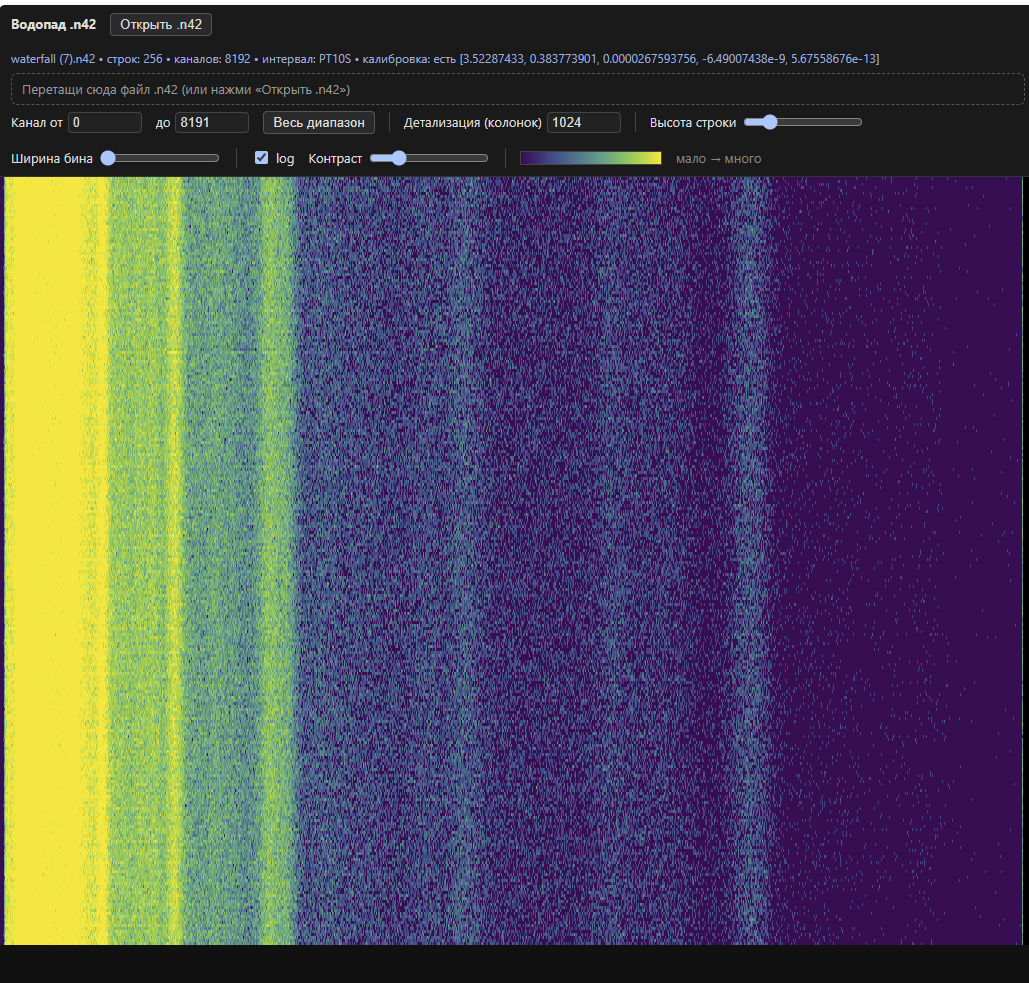
A ready-made sample example-waterfall.n42 (export of
a real run) ships with the repo — drag it into the viewer to see the result right away
without connecting to a board.
waterfall_client.py — capture to .aswf
Writes an unbounded .aswf from the WS stream (not limited by the board’s 256-row
ring). Stop with Ctrl+C — the header with the final row count is written on exit.
The .aswf can then be converted to N42 via waterfall_n42.py convert.
wf_pull_client.py / wf_recorder_app.py — pull recording with on-the-fly stitching (#REC-12)
An alternative to waterfall_client.py aimed at multi-hour/multi-day recording without
holding a live WS connection: the script periodically polls /api/waterfall/segments,
pulls each finalized segment exactly once, appends its rows to a single growing
.aswf, and deletes the segment on the board only after the local file is fsynced —
so a dropped connection or crash mid-transfer never loses or duplicates rows. Progress
(which segments are already ingested, running row/duration totals) is tracked in a
sidecar <file>.state.json next to the .aswf, so stopping and re-running against the
same file resumes the recording instead of restarting it.
wf_recorder_app.py (launch by double-clicking wf_recorder.bat) is a desktop GUI
(tkinter) on top of the same logic: ▶ Start/⏸ Stop buttons, New file… (stops the
current recording, lets you pick a new path, and wipes that path’s .aswf +
.state.json + .temps.csv if they already exist — so you start from a genuinely clean
slate instead of resuming an old recording) and Open folder; it shows live counters
for rows in the file, duration, instrument temperature, and board segment counts.
python wf_pull_client.py <board-ip> --stitch capture.aswf --interval 60
What opens N42 / .aswf
| Tool | By | Note |
|---|---|---|
| InterSpec | Sandia | Best choice; shows the measurement time-history |
waterfall_viewer.html |
this repo | 2D waterfall (heatmap), offline, .n42 and .aswf |
| waterfall-viewer | separate repo | Advanced native viewer: 3D waterfall render, 2D map, a slice/section/sample panel |
| PeakEasy | LANL | Spectrum viewer |
| Cambio | Sandia | Converter/viewer |