atomspectra-waterfall-esp32
AtomSpectra → ESP32-S3 → Web UI
🇷🇺 Русская версия · 🇬🇧 English
A WiFi gateway for the KB Radar “Atom Spectra” gamma spectrometer, built on the ESP32-S3 with USB OTG Host.
It connects to the spectrometer over USB (not BLE!), receives the 8192-channel spectrum in real time, and displays it in your browser — with axes, a logarithmic scale, energy calibration in keV, and export to the BecqMoni, InterSpec, N42.42 and LSRM formats.




What it solves
The desktop AtomSpectra application is excellent, but it requires the spectrometer to be plugged directly into a computer over USB. This gateway turns an ESP32-S3 into a WiFi bridge:
- the spectrometer connects to the ESP over USB — a tiny board sits right next to the instrument;
- the spectrum is available in any browser over WiFi — no cables to a PC;
- BecqMoni XML downloads in one click — opens directly in BecqMoni;
- InterSpec CSV — for InterSpec by Sandia;
- N42.42 (
RadInstrumentData) and LSRM.spe— industrial N42 and the SpectraVibe format for gamma analysis; - a TCP bridge (port 8234) — BecqMoni / AtomSpectra on a PC can connect over WiFi instead of a COM port;
- spectra are stored on flash (up to ~400) — accumulate them and export later.
No cloud. No accounts. Everything runs on your local network.
⚠ Before you start
The gateway connects to the spectrometer over USB and sends it standard control
commands (-inf, -sta, -rst). With the “clear spectrum on start” option
enabled, the board will send the instrument -rst — the spectrum accumulated
in the instrument will be erased.
- Save important accumulated spectra with the AtomSpectra desktop software before connecting the instrument to the gateway.
- Flashing/OTA of the ESP32 board itself does not affect the instrument, but an interrupted flash may require re-flashing over USB.
Disclaimer
The firmware is provided “as is”, without any warranty. The author is not liable for any direct or indirect damage: reset of accumulated data or instrument settings, data loss, or the instrument or board becoming inoperable. By using the firmware you accept these terms and act at your own risk.
Architecture
                          USB-C OTG cable
┌──────────────────┐    (host → device)    ┌──────────────────┐
│  KB Radar        │ ◄──────────────────── │  ESP32-S3        │
│  Atom Spectra    │   shproto @ 600 kBd   │  (USB OTG Host)  │
│  (gamma          │   8192 ch × 32 bit    │                  │
│   spectrometer,  │   + stat + calibr.    │  WiFi 2.4 GHz    │
│   FTDI FT232R)   │                       │  ┌────────────┐  │
└──────────────────┘                       │  │ Web UI     │  │──► Browser
                                           │  │ REST API   │  │──► BecqMoni (TCP:8234)
                                           │  │ LittleFS   │  │──► InterSpec (CSV)
                                           │  │ 12.9 MB    │  │
                                           │  └────────────┘  │
                                           └──────────────────┘
What you see in the Web UI
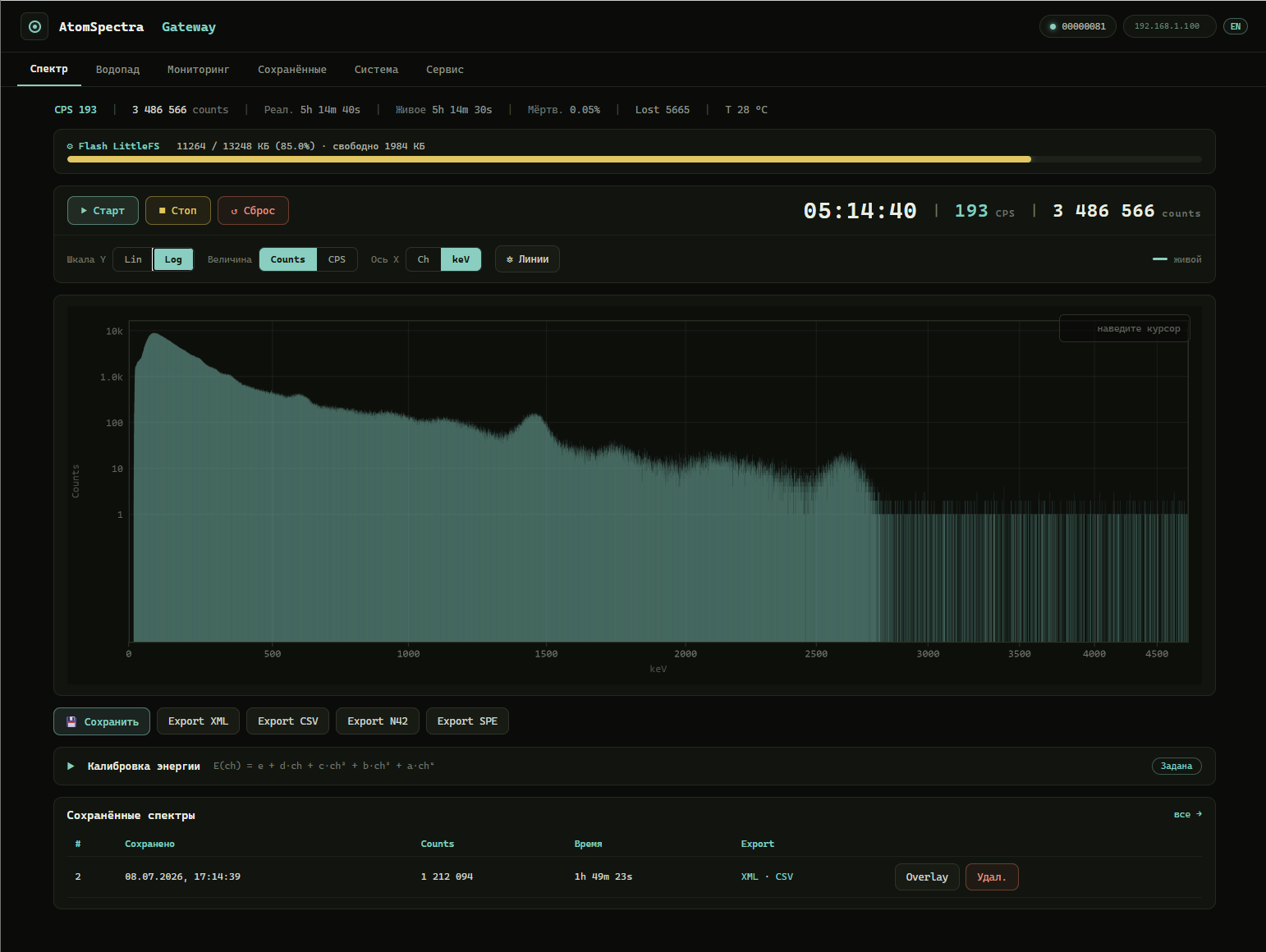
🔴 Live demo of this Web UI (no board required): https://vibeengineering-llc.github.io/atomspectra-waterfall-esp32/demo/
The Web UI opens in a browser at http://<board-IP>/:
Spectrum (canvas 1200×400)
- Live 8192-channel spectrum, refreshed once per second
- Axes with grid, tick labels, and a frame
- Log / Lin — toggle logarithmic / linear Y scale
- CPS / Counts — instantaneous count rate or accumulated pulses
- Ch / keV — channels or energy (requires calibration from the instrument)
- Cursor — hover over the spectrum → channel, energy, counts, CPS
Instrument control
- ▶ Start / ■ Stop / ↻ Reset — start/stop/reset acquisition on the instrument
- Arbitrary text command (
-inf,-nos 5, etc.) - Reboot the instrument (CMD 0xF3) and reset WiFi
Big display
- Acquisition time (hours:minutes:seconds)
- CPS (counts per second)
- Total counts
Spectra
- Save the current spectrum to flash
- Load a saved one — overlaid on the live spectrum for comparison (overlay)
- Export XML — download a BecqMoni-compatible file
- Export CSV — download an InterSpec-compatible file
- Export N42 — download ANSI N42.42 (
RadInstrumentData) - Export SPE — download LSRM
.spe(SpectraVibe format) - Delete saved spectra
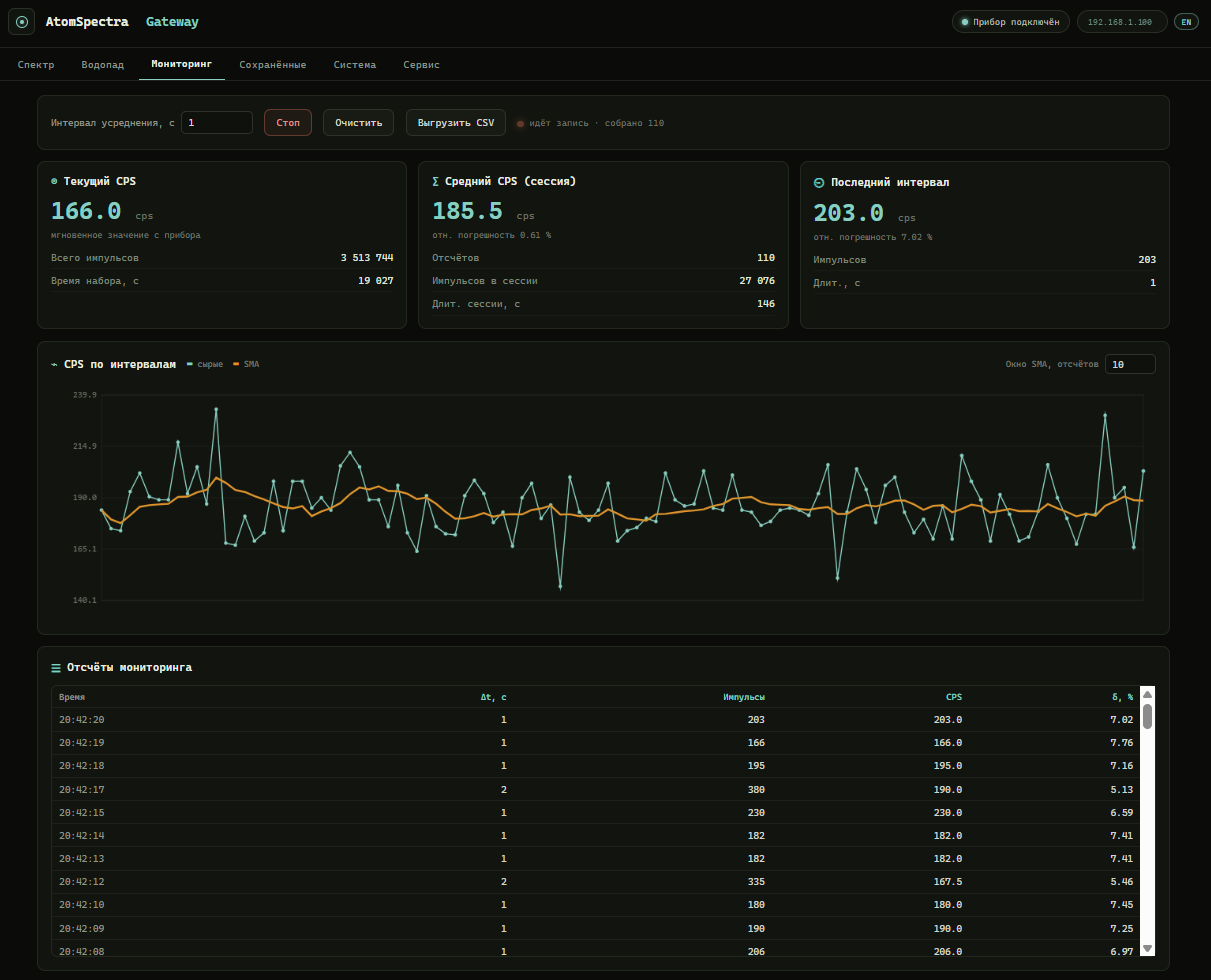
“Monitoring” tab — count-rate (CPS) logging with averaging over a chosen interval: current CPS, session mean CPS with statistical uncertainty, last interval, a “raw counts + simple moving average (SMA)” chart, a samples table and CSV export:
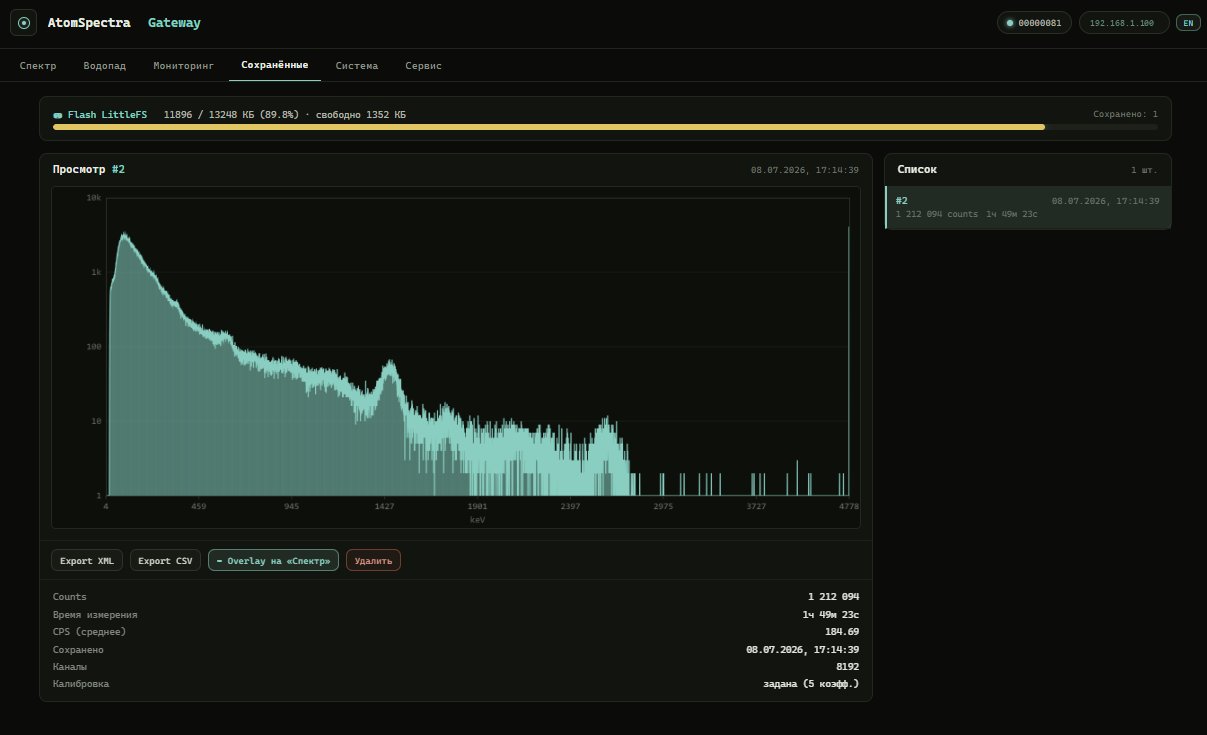
“Saved” tab — spectra stored in flash: a list with date, counts and duration; view a selected one, overlay it on the live spectrum (“Overlay on Spectrum”), export XML/CSV and delete:
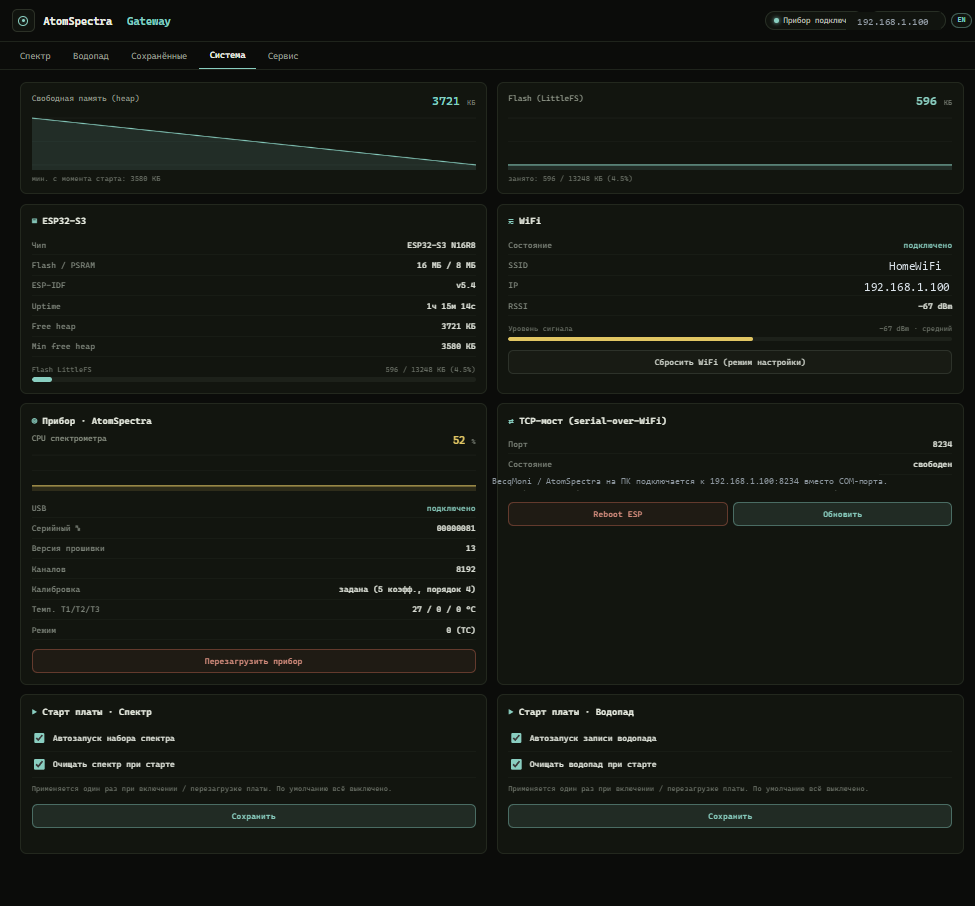
“System” tab — heap/flash, WiFi (SSID, IP, RSSI), uptime, last reset reason, TCP bridge state:
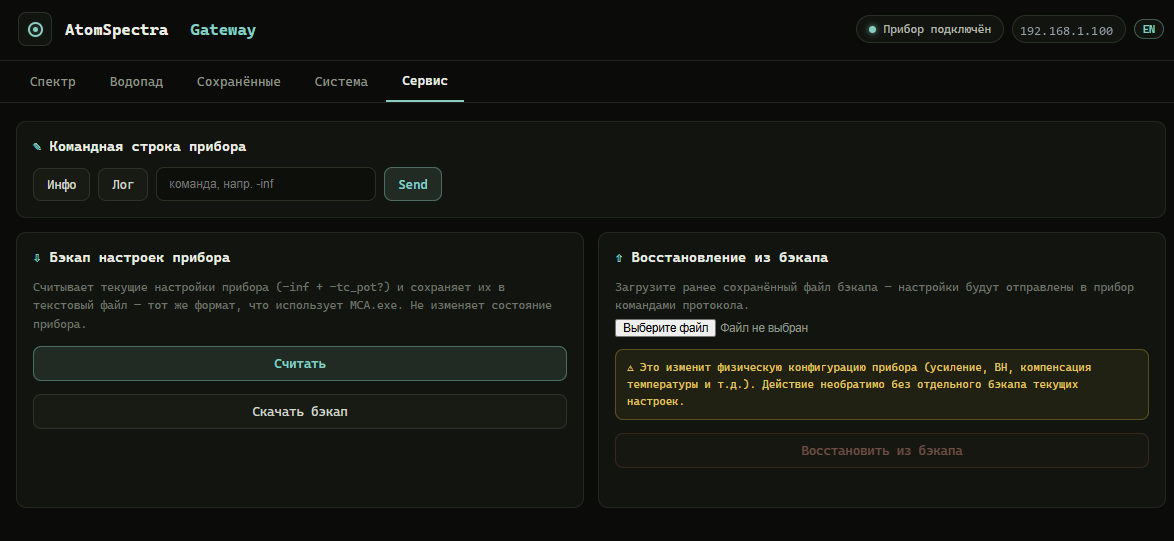
“Service” tab — arbitrary instrument commands, exchange log (devlog), settings backup and restore:
Export
BecqMoni XML (/api/export.xml)
The full 8192-channel spectrum in the ResultDataFile format (FormatVersion 120920):
EnergyCalibration— polynomial coefficients from the instrumentValidPulseCount/TotalPulseCount/MeasurementTime/LiveTime- 8192
<DataPoint>elements - Compatible with BecqMoni: File → Open → select the downloaded
.xml
InterSpec CSV (/api/export.csv)
Headers with calibration coefficients, serial number, and timing:
calibcoeff— calibration polynomiallivetime/realtime— real and live time (live time accounts for detector dead time)- 8192 lines of
channel, count(1-based) - Compatible with InterSpec: File → Open → select the
.csv
ANSI N42.42 (/api/export.n42)
Spectrum in the industrial RadInstrumentData XML format (ANSI/IEEE N42.42 standard):
EnergyCalibrationwith the polynomial coefficients from the deviceRealTimeDuration/LiveTimeDuration(ISO-8601,PT…S)ChannelData— 8192 values- Imports into InterSpec, Cambio and other N42-aware software
LSRM .spe (/api/export.spe)
Spectrum in the LSRM text format (used by SpectraVibe):
$SPEC_ID:/$MEAS_TIM:(live realtime) /$DATA:/$ENER_FIT:sections- 8192 channels, one value per line
- Convenient for gamma analysis in tools that read the LSRM format
What you need
Hardware:
- ESP32-S3-DevKitC-1 N16R8 (16 MB Flash, 8 MB PSRAM) — it must be the S3 with USB OTG (buy on Ozon)
- USB-C OTG cable — from the ESP32-S3 (host) to the spectrometer (device)
- A KB Radar “Atom Spectra” spectrometer (with a USB port, FTDI FT232R inside)
- A USB cable for flashing the ESP (via the UART port, not OTG)
Software:
- ESP-IDF v5.4 (the tested version; builds in CI) or Docker (
espressif/idf:v5.4) - CH343 driver (if the board uses a CH343 USB-UART: WCH driver)
Detailed install from scratch — see
INSTALL.en.md. Known issues and limitations — seeKNOWN_ISSUES.en.md.
Quick start (5 minutes)
# 1. Clone
git clone https://github.com/VibeEngineering-LLC/atomspectra-waterfall-esp32.git
cd atomspectra-waterfall-esp32

# 2. Build (option A: local ESP-IDF)
idf.py set-target esp32s3
idf.py build

# 2. Build (option B: Docker, no ESP-IDF install)
docker run --rm -v "$(pwd):/project" -w /project espressif/idf:v5.4 \
  bash -c ". /opt/esp/idf/export.sh && idf.py build"

# 3. Flash (substitute your own COM port)
idf.py -p COM14 flash

# 4. Connect to WiFi
#    The board raises an AP "AtomSpectra-Setup" → captive portal → enter SSID and password

# 5. Open in a browser
#    http://<board-IP>/

# 6. Connect the spectrometer with a USB-C OTG cable to the ESP32-S3 USB port
#    The spectrum appears automatically
Network modes: Indoor and Outdoor
The board runs in two modes. The Indoor / Outdoor toggle is visible right in the header of the start page.
🏠 Indoor (STA) — as described above: the board is a client of your home WiFi, the
spectrum is served at http://<board-IP>/, time comes from SNTP over the internet, and
waterfall segments are uploaded to the receiver automatically.
🌲 Outdoor (field AP) — the board becomes a Wi-Fi access point itself; no router and no internet needed. This is the mode for field measurements when all you have is a phone (and, optionally, a power bank to run the board):
- SSID
AtomSpectra-Outdoor, passwordatomspectra(WPA2-PSK), address192.168.4.1; - the phone joins this network and gets the full board Web UI: live spectrum, waterfall,
export (N42/XML/SPE/CSV), instrument control (
-sta/-sto/-rst), calibration, saved spectra; - meanwhile waterfall data accumulates on the board’s own flash (LittleFS partition) — pulled later at home, in Indoor mode, by the receiver;
- everything works offline: no SNTP, no outbound upload, no cloud.
What happens on connect (captive landing).
As soon as the phone joins AtomSpectra-Outdoor, the OS runs its usual connectivity check
(Android generate_204, iOS/macOS hotspot-detect, Windows ncsi). The board answers it
with a lightweight sign-in page, so the phone shows the familiar “Sign in to network”
notification (like a café or airport). That page shows the device address in large type
— 192.168.4.1 and atomspectra.local — and opens the device page itself within ~1 s;
an “Open device →” button is there too.
- The sign-in page is deliberately lightweight (no external fonts or scripts) so it always renders in the phone’s stripped-down “captive browser”, where the heavy main UI sometimes fails to load.
- If the auto-redirect doesn’t fire (iOS’s built-in captive browser can block navigation),
the address stays on screen: open Safari/Chrome and type
192.168.4.1by hand.
How to enter Outdoor:
- Toggle Indoor → Outdoor in the start-page header. The board reboots and raises the access point; this is a “sticky” mode — it persists across reboots until you toggle back;
- Automatically (fallback) — if the home network is unreachable for ≥ 90 s, the board raises the field AP one-shot: the next reboot tries the home network again. Handy when you carried the board out of router range without touching settings;
- On a fresh (unconfigured) board — a “Field mode (Outdoor)” button in the setup portal.
Return to Indoor with the same header toggle (or, for the fallback case, simply reboot within range of the home network).
Full field workflow: at home in Indoor, set up waterfall recording → switch to Outdoor →
take the board + phone (+ power bank) into the field → join AtomSpectra-Outdoor → the
sign-in page pops with the address → work with the spectrum and waterfall → back home, switch
to Indoor → the receiver pulls the accumulated waterfall segments off the board’s flash.
Time in field mode
Outdoor has no internet → SNTP does not work. The board’s time comes from the phone
browser automatically on opening any page (and once an hour). Manual correction — a
datetime-local field in the System section. When SNTP is active (at home), manual /
browser setting is ignored — the time source does not fight itself.
Exports (N42/XML/spe/CSV) taken before time has arrived (clock = 1970) are marked “TIME NOT SYNCHRONIZED” and do not corrupt normal recordings.
Field access point password
The default password atomspectra is public and documented. The instrument
(including -rst, which clears the spectrum) is controlled through the open AP — for
crowded places change the password in the System section (AP password field +
confirmation; applied after reboot). With the default password the Web UI shows a warning.
BT/BLE
The board works over USB only (to the spectrometer) and WiFi. Bluetooth/BLE is
not used and not built (CONFIG_BT_ENABLED=n): the ESP32-S3 BLE radio is not
initialized in any mode and consumes no RAM or power.
Web API
| Endpoint | Method | What it does |
|---|---|---|
/ |
GET | Web UI |
/api/csrf-token |
GET | Issue a CSRF token (required in the X-CSRF-Token header on all POSTs) |
/api/status |
GET | Device status (JSON) |
/api/spectrum.json |
GET | Live spectrum + statistics + calibration |
/api/spectrum |
GET | Raw binary spectrum (32768 bytes) |
/api/export.xml |
GET | BecqMoni XML (live spectrum) |
/api/export.csv |
GET | InterSpec CSV (live spectrum) |
/api/export.n42 |
GET | ANSI N42.42 (live spectrum) |
/api/export.spe |
GET | LSRM .spe (live spectrum) |
/api/command |
POST | Send a text command to the instrument |
/api/devlog |
GET | Recent instrument text replies (ring buffer, ?since=N param) |
/api/reset |
POST | Reset the spectrum counters |
/api/save |
POST | Save the spectrum to flash |
/api/list |
GET | List saved spectra (JSON) |
/api/saved/<N>/export.xml |
GET | Export a saved spectrum (XML) |
/api/saved/<N>/export.csv |
GET | Export a saved spectrum (CSV) |
/api/saved/<N>/spectrum.json |
GET | Saved spectrum (JSON) |
/api/saved/<N>/delete |
POST | Delete a saved spectrum |
/api/device |
GET | Instrument info (settings, calibration, serial) |
/api/system |
GET | ESP32 health (heap, uptime, RSSI, flash) |
/api/calibration |
POST | Set calibration coefficients manually |
/api/reboot-device |
POST | Reboot the spectrometer (CMD 0xF3) |
/api/reboot-esp |
POST | Reboot the ESP32 |
/api/wifi/reset |
POST | Reset WiFi, reboot into setup mode |
/api/time |
POST | Set board time (auto from browser / manual) — field mode |
/api/net-mode |
POST | Switch Indoor/Outdoor, reboot |
/api/ap-pass |
POST | Change field AP password, reboot |
/waterfall · /api/waterfall/* · /ws/waterfall |
GET/POST/WS | Waterfall (spectrogram): record, snapshot, stream — see WATERFALL.en.md |
All POST endpoints require the
X-CSRF-Tokenheader with the value obtained fromGET /api/csrf-token. The Web UI does this automatically. The CSRF token is generated at board startup and protects against request forgery from a third-party page in the browser.
Security and trust model
The gateway is designed for a trusted local network (home Wi-Fi) and has no user authentication — anyone on the same network can open the Web UI, read the spectrum, and control the instrument. This is a deliberate choice for a home device with no cloud and no accounts; do not expose the board directly to the internet.
What is protected:
- A CSRF token on all mutating POSTs (
/api/command,/api/reset,/api/save,/api/reboot-*,/api/wifi/reset,/api/calibration, spectrum deletion). A third-party tab in the operator’s browser cannot read the token (same-origin policy), so it cannot blindly send, for example, a Wi-Fi reset or a reboot. - The TCP bridge (port 8234) — one client at a time.
What is absent (by design): TLS, login/password, access control. If you need external access, set it up over a trusted channel (VPN / reverse proxy with authentication), not via port forwarding.
External connections: the board makes SNTP requests to pool.ntp.org to synchronise
the system clock (used in spectrum timestamps and file names). No other outgoing internet
connections are made — spectra and data stay on the local network.
TCP bridge (port 8234)
A transparent serial-over-WiFi bridge. BecqMoni or AtomSpectra on a PC connect to
<board-IP>:8234 instead of a COM port — and work as usual.
- One client at a time
- The Web UI works in parallel with the TCP bridge
TCP_NODELAYfor minimal latency
Waterfall (spectrogram)
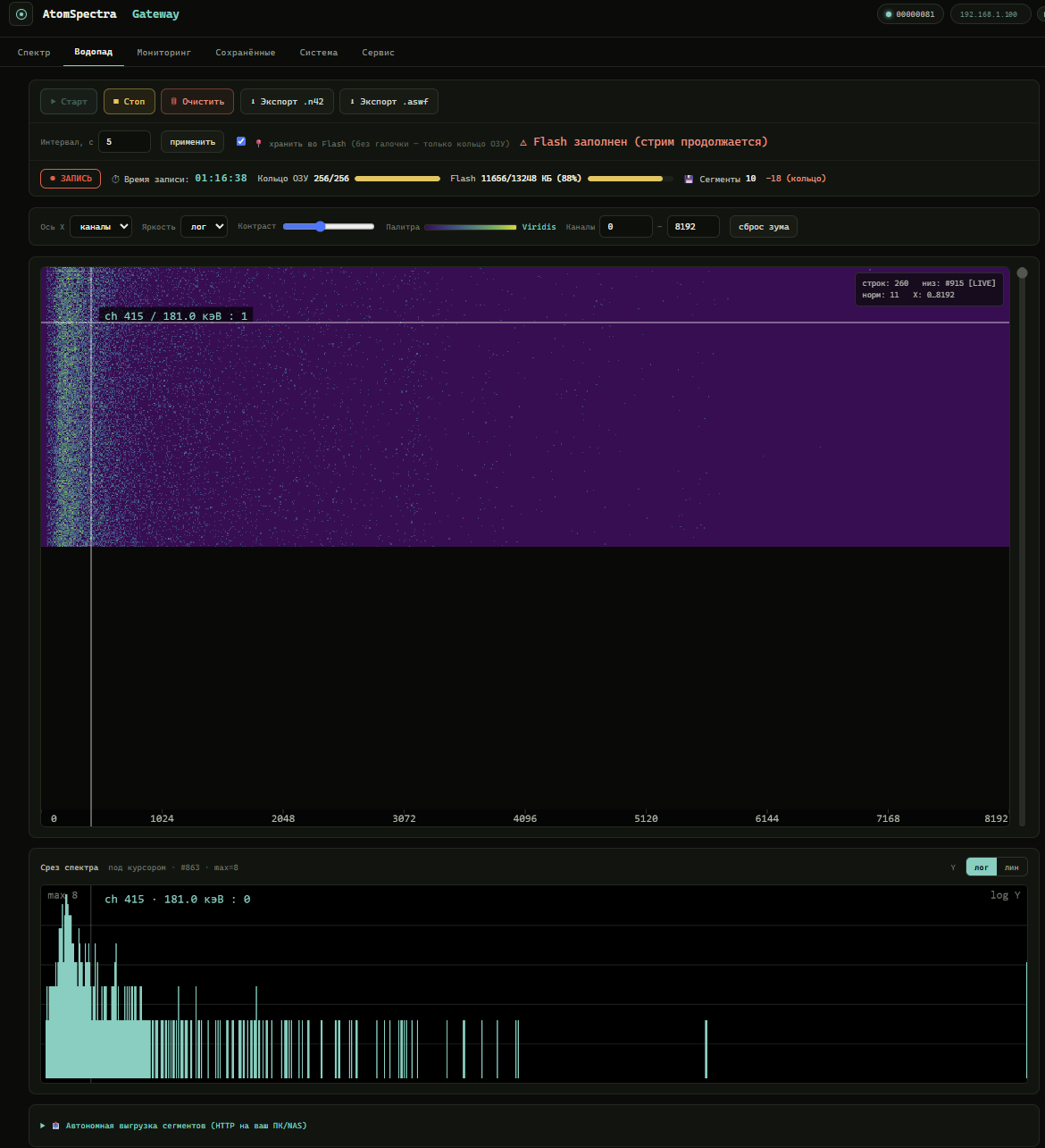
Besides the live spectrum, the gateway can accumulate a waterfall — a sequence of
spectra at equal intervals (each row = the accumulation delta over one period, 8192
channels, uint16). Recording happens on the board itself: hit “Start” and the
board keeps writing .aswf segments to flash on its own, surviving a closed tab, a
reboot, or a power loss (#REC-11-A1). Finished segments can be viewed right in the
browser (http://<board-IP>/waterfall), streamed to a PC over WebSocket in real
time, pulled over HTTP and stitched into one file (wf_pull_client.py /
wf_recorder_app.py, #REC-12 — for multi-hour/multi-day recordings without a
standing connection), or exported with the “⬇ Export .n42” button right from the
Web UI to the industry-standard ANSI N42.42 (InterSpec / PeakEasy / Cambio). The
interval between rows is 5 s…60 min. The spectrogram colour is any of
14 palettes (Inferno by default; the choice is saved in the browser).
🔴 Live demo on real data: https://vibeengineering-llc.github.io/atomspectra-waterfall-esp32/demo/ — the very same spectrogram from the firmware’s Web UI, rendered from a real
.aswfcapture of an “Atom Spectra” instrument (480 rows × 8192 channels, real calibration). No board required: hover the image and a per-row spectrum slice with a keV energy axis appears below.
scripts/ holds the PC-side tools: N42 export (waterfall_n42.py), an offline 2D
waterfall viewer (waterfall_viewer.html), .aswf capture (waterfall_client.py), and a
desktop recorder with on-the-fly segment stitching (wf_recorder_app.py /
wf_pull_client.py, #REC-12) for multi-hour/multi-day recording without holding a live
WS connection.
Prebuilt Windows exe of the recorder (no Python install needed):
wf-recorder-v0.1.0— self-containedwf_recorder.exe(~12 MB), double-click to launch. Validated by an 11-hour soak test (60 segments, 660 rows, 0 losses; reportdocs/rec12_report.md).
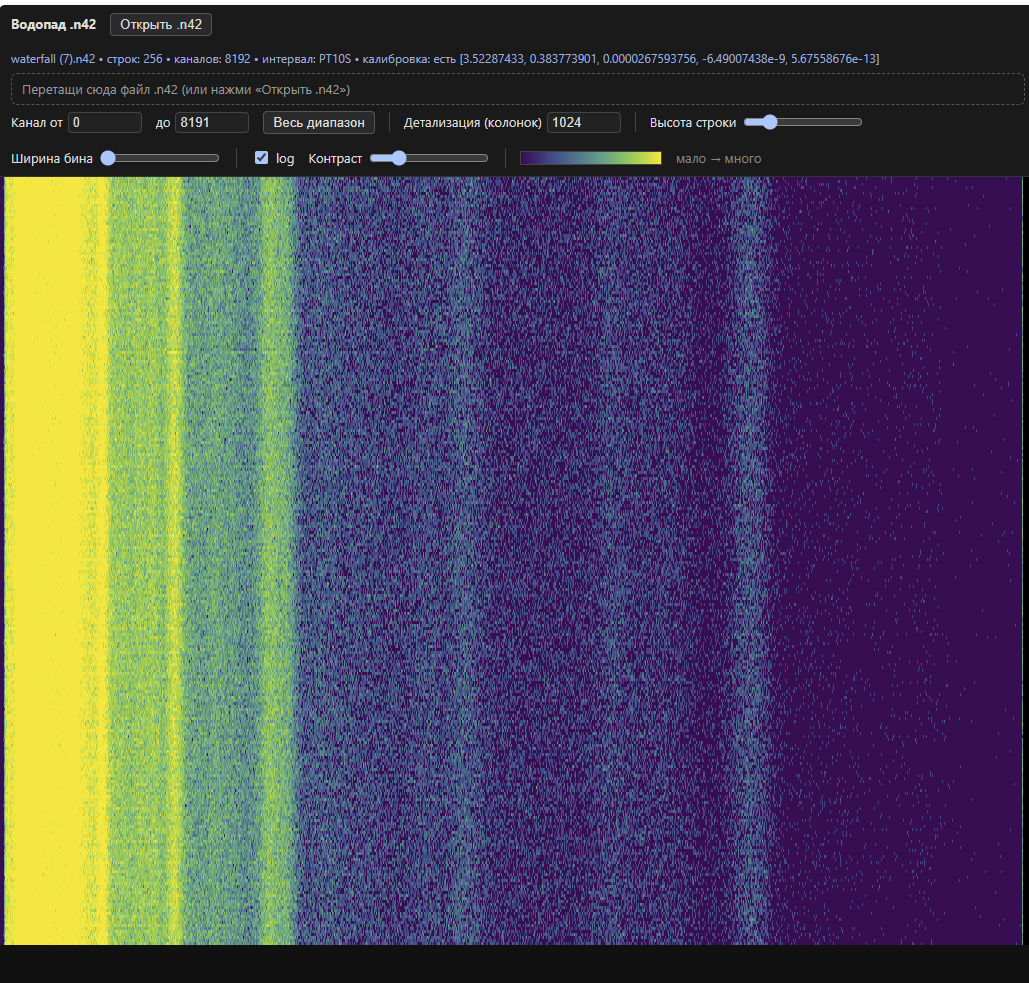
Advanced viewer. For a full native application (3D waterfall render, 2D map, a slice/section/sample panel) see the separate repository waterfall-viewer — more capable than the single-file HTML viewer in
scripts/.
📖 Formats (ASWW / ASWF / N42), the full waterfall Web API, calibration, and how to use
the scripts — WATERFALL.en.md.
Protocol
Atom Spectra communicates over the binary shproto protocol via USB serial (600000 baud):
| Parameter | Value |
|---|---|
| Start byte | 0xFE |
| Escape byte | 0xFD (next byte = ~byte & 0xFF) |
| Finish byte | 0xA5 |
| CRC | CRC-16 Modbus (init 0xFFFF, poly 0xA001) |
| Commands | 0x01 histogram, 0x03 text, 0x04 statistics, 0xF3 reboot |
Calibration: the instrument returns 5 polynomial coefficients in response to the -inf
command (10 lines of hex-encoded doubles + CRC32). Polynomial: E(ch) = c₀ + c₁·ch + c₂·ch² + c₃·ch³ + c₄·ch⁴.
📖 Full reference of all device commands and packet formats — PROTOCOL.en.md.
Project layout
atomspectra-waterfall-esp32/
├── components/shproto/       shproto protocol (CRC-16 Modbus, escaping)
│   ├── shproto.c
│   └── include/shproto.h
├── main/
│   ├── atomspectra.h          project header, data types
│   ├── main.c                 entry point, SNTP
│   ├── boot_config.c          board start-up behavior (NVS flags, #FW-2/#FW-3)
│   ├── usb_host_cdc.c         USB Host CDC-ACM + FTDI vendor init
│   ├── wifi_manager.c         STA + AP captive portal
│   ├── web_server.c           HTTP API + BecqMoni XML + InterSpec CSV
│   ├── web_util.c             shared Web server HTTP helpers
│   ├── tcp_bridge.c           transparent serial-over-WiFi bridge
│   ├── spectrum.c             spectrum processing + LittleFS storage
│   ├── spectrogram.c          waterfall: PSRAM ring + flash recording
│   ├── web_waterfall.c        waterfall: HTTP/WS API (ASWW/ASWF)
│   └── wf_offload.c           waterfall: auto-offload segments via HTTP POST (#REC-11-A2)
├── web/
│   ├── index.html             main Web UI (spectrum, buttons, export)
│   ├── waterfall.html         waterfall Web UI (heatmap)
│   └── setup.html             captive portal (WiFi setup)
├── scripts/                   PC tools: N42 export, viewer, capture, recorder
│   ├── waterfall_n42.py       waterfall → ANSI N42.42
│   ├── waterfall_viewer.html  offline 2D .n42/.aswf viewer
│   ├── waterfall_client.py    capture WS stream to .aswf
│   ├── wf_pull_client.py      segment pull + on-the-fly stitching into .aswf (#REC-12)
│   └── wf_recorder_app.py     desktop GUI on top of wf_pull_client.py (+ wf_recorder.bat)
├── partitions.csv             partition table (3 MB app + 12.9 MB LittleFS)
├── sdkconfig.defaults         ESP32-S3 USB OTG config
├── CMakeLists.txt
├── INSTALL.en.md              detailed install guide
├── KNOWN_ISSUES.en.md         known issues and limitations
├── LICENSE                    MIT
└── README.en.md               this file
⚠ Disclaimer
All experiments with spectrometers and connected equipment are performed entirely at your own risk. The project is provided “as is”, without any warranty of any kind. The authors and contributors are not liable for any damage, direct or indirect: damage to the spectrometer, the detector, the PMT, the ESP32 board, your computer or any other equipment, nor for any loss of data or of the instrument’s settings.
In particular:
- The instrument’s configuration commands (
-ris,-fall,-nos,-max,-hyst,-U,-V,-step, etc.) change the internal signal-processing configuration and the hardware HV/gain parameters (POT/POT2). Wrong values can corrupt the detector’s factory tuning or damage the instrument. These parameters are specific to each individual unit — do not write them blind and do not copy values from another unit. SeeKNOWN_ISSUES.en.md(BUG-AS-08). - The detector’s high voltage (HV) can be hazardous to the instrument if set incorrectly.
- Restoring corrupted detector tuning is done by the instrument’s manufacturer (KB Radar), not by this gateway. If the factory detector profile is lost, contact the manufacturer — do not try to restore the parameters yourself.
By using this project you acknowledge that you understand these risks and accept full responsibility for your actions with the equipment.
License
MIT — see LICENSE.
Credits
- KB Radar (kbradar.org) — maker of the Atom Spectra spectrometer.
- Am6er/BecqMoni (github) — reference UI implementation for AtomSpectra, the XML format.
- InterSpec (Sandia Labs) — gamma spectrum analysis.
- Espressif — ESP-IDF and the USB Host stack.